
Alternator - ’l’ series with air conditioning
- Make
- Rover
- Model
- 200 Workshop Manual
- Year
- 1995–1999
- Section
- Repairs › Alternator - ’l’ series with air conditioning
ElectricalAlternator - ’l’ series with air conditioning · page 1 of 3
Refit
- Remove plugs from connections.
- Clean all pipe connections.
- Position alternator to mounting bracket.
- Connect oil feed pipe to cylinder block and tighten union.
- Fit bolts securing alternator to mounting bracket and tighten the lower bolt to 45 Nm and the upper bolt to 25 Nm.
- Tighten oil feed pipe union to vacuum pump.
- Connect vacuum hose to vacuum pump and secure hose with clip.
- Align vacuum pipe bracket to camshaft cover and tighten bolt.
- Connect oil return pipe to sump.
- Remove drain tin from beneath vehicle.
- Remove stand(s) and lower vehicle.
- Connect battery cable to alternator stud tighten nut to 4 Nm and position cover.
- Connect multiplug to alternator.
- Lower engine, fit nut securing mounting bracket to engine mounting and tighten to 85 Nm.
- Tighten nuts, engine mounting restraint bar to body, to 45 Nm.
- Connect steady bar to engine mounting bracket, fit through bolt and tighten to 80 Nm.
- Remove jack positioned to support engine.
- Fit auxiliary drive belt. See this section.
- Fit engine acoustic cover. See BODY, Exterior fittings.
- Connect battery earth lead.
ALTERNATOR - ’L’ SERIES WITH AIR CONDITIONING
Service repair no - 86.10.02.20
Remove
- Disconnect battery earth lead.
- Raise front of vehicle.
WARNING: Support on safety stands.
- Remove undertray. See BODY, Exterior fittings.
- Remove auxiliary drive belt. See this section.
- Remove engine acoustic cover. See BODY, Exterior fittings.
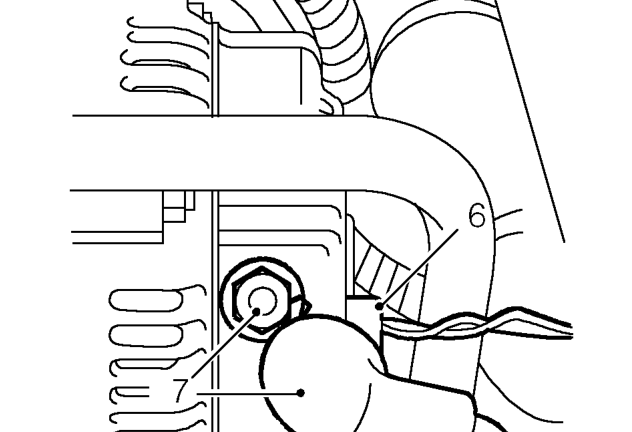
- Disconnect multiplug from alternator.
- Release cover, remove nut and disconnect battery cable from alternator.
Parts & tools for this job For 1995 Rover 200
- TOOLBattery testerSearch: car battery tester
- TOOLDigital multimeterSearch: automotive digital multimeter
- TOOLBattery terminal cleanerSearch: battery terminal cleaner
Links open Amazon search results in a new tab. As an Amazon Associate I earn from qualifying purchases.