
Front and rear door window switch
- Make
- Rover
- Model
- 400 Workshop Manual
- Year
- 1995–2000
- Section
- Repairs › Front and rear door window switch
ElectricalFront and rear door window switch
FRONT AND REAR DOOR WINDOW SWITCH
Service repair no - 86.25.06
Remove
- Remove rear console. See BODY, Interior trim components.
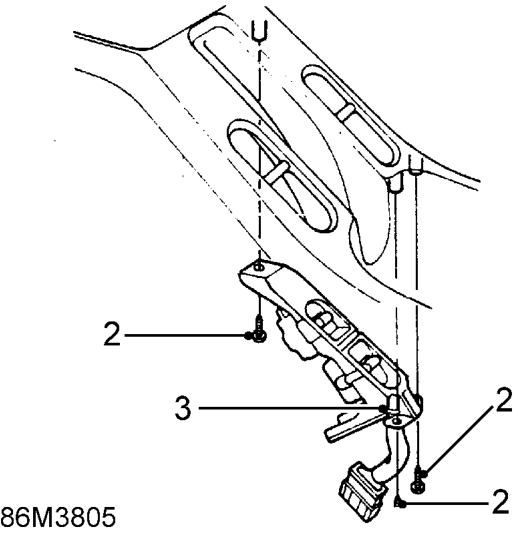
- Remove 3 screws and remove switch assembly.
- Remove cable strap securing switch harness.
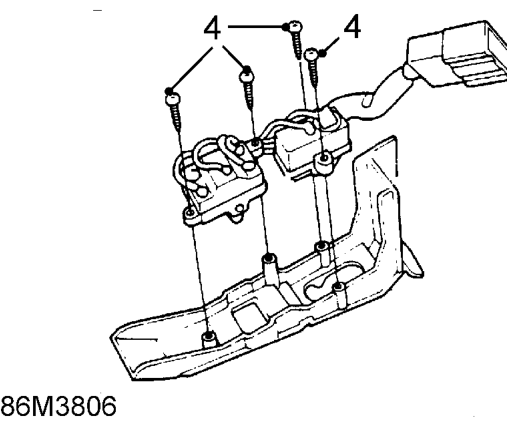
- Remove 4 screws and remove switches from panel.
Refit
- Fit switches to panel and secure with screws.
- Secure switch harness to panel with cable strap.
- Fit switch assembly and secure with screws.
- Fit rear console. See BODY, Interior trim components.
DRIVER’S WINDOW SWITCH
Service repair no - 86.25.07
Remove
- Remove front door casing. See BODY, Doors.
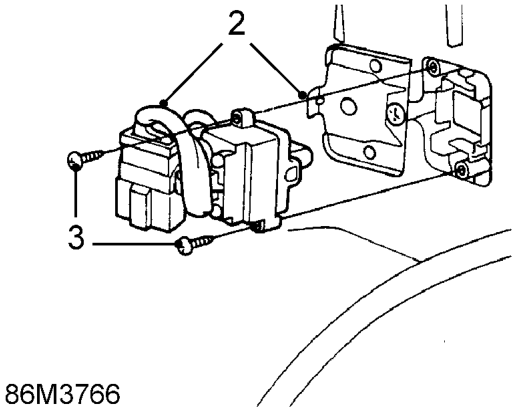
- Release multiplug from bracket.
- Remove 2 screws and remove switch.
Refit
- Fit switch and secure with screws.
- Fit multiplug to bracket.
- Fit front door casing. See BODY, Doors.
Parts & tools for this job For 1995 Rover 400
- TOOLOBD2 scannerSearch: OBD2 scanner
- TOOLDigital multimeterSearch: automotive digital multimeter
- TOOLBack-probe test leadsSearch: back probe test leads
Links open Amazon search results in a new tab. As an Amazon Associate I earn from qualifying purchases.