
Power Antenna Motor Replacement
- Make
- Rover
- Model
- 600 Rover 600 Repair Manual - Volumes 1 and 2 - 2nd Edition
- Section
- Repairs › Power Antenna Motor Replacement
ElectricalPower Antenna Motor Replacement
Power Antenna Motor Replacement
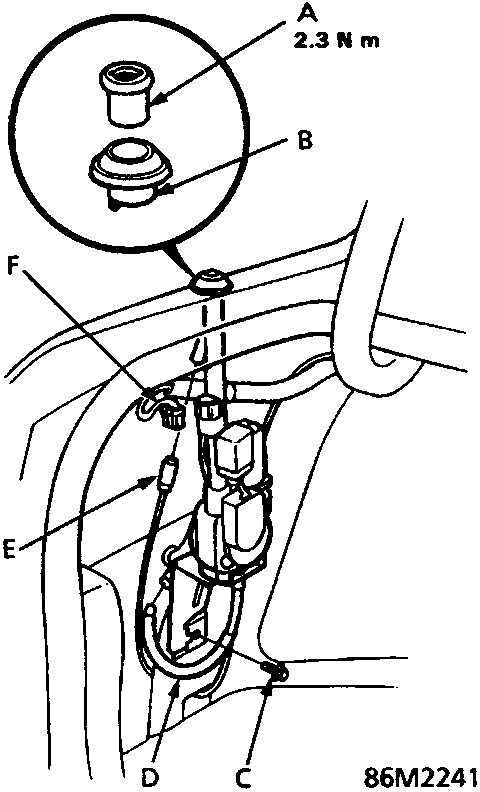
- A Special nut
- B Spacer
- C Mounting nut
- D Drain hose
- E Antenna lead
- F 3 – P connector
- Remove the left boot side trim panel.
- Disconnect the 3 – P connector and antenna lead from the motor, then remove the special nut and mounting nut to take out the motor with the antenna mast.
- During installing, tighten the special nut, then tighten the mounting nut on the motor bracket.
- Clean the threads on the antenna mast housing. Insert the antenna mast into the antenna housing. Install the bushing and spacer, and tighten the special nut to 2.3 Nm.
Note: If the special nut is over – torqued, the antenna may stick. If sticking occurs, back the nut off until the antenna moves freely.
- Check that the antenna mast extends and retracts fully when the radio switch is turned ON and OFF repeatedly.
Door Speaker Replacement
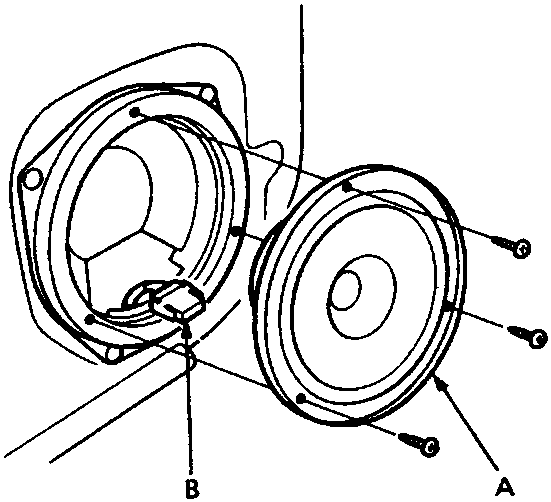
- A Door speaker
- B 2 – P connector
- Remove the door panel.
- Remove the three screws, then disconnect the 2 – P connector from the speaker and remove the speaker.
Parts & tools for this job For Rover 600
- TOOLDigital multimeterSearch: automotive digital multimeter
- PARTAssorted fuse kitSearch: car fuse assortment kit
- TOOLWire crimper and connector kitSearch: wire crimper connector kit
Links open Amazon search results in a new tab. As an Amazon Associate I earn from qualifying purchases.