* : With rear power windows
[ ]: RHD
3. Check for continuity between the C [D] and D [E] terminals. There should be continuity. If there is no continuity, check the bulb(s).
Switch Removal
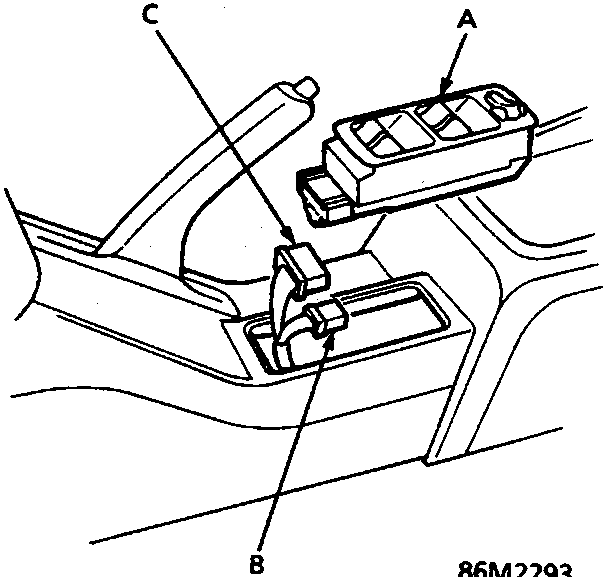
Master Power Window Switch
[ ]: RHD
A Master power window switch
B 3 – P [2 – P] Connector
C 16 – P connector
1. Carefully push the master power window switch out from behind the rear console.
2. Disconnect the 16 – P and 3 – P [2 – P] connectors from the switch.
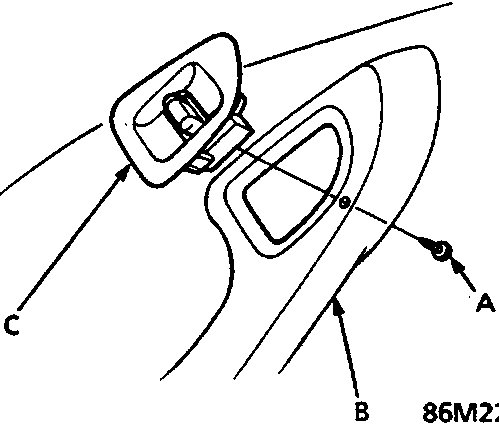
A Screw
B Armrest
C Rear window switch
1. Remove the rear door panel from the door and disconnect the connectors, see BODY
2. Remove the screw and the switch from the armrest.
Links open Amazon search results in a new tab. As an Amazon Associate I earn from qualifying purchases.
Help keep workshop manuals free
workshop-manuals.com provides free online workshop manuals.
If they helped you fix your car, please consider sharing or
making a small donation to keep the servers running.

![Circuit diagram showing two light bulbs (0.56W) connected between terminals C [D] and D [E].](/rover/600/assets/page_1299_fig02.png)