
Circuit Diagram (page 2 of 2)
- Make
- Rover
- Model
- 600 Rover 600 Repair Manual - Volumes 1 and 2 - 2nd Edition
- Section
- Repairs
ElectricalCircuit Diagram · page 2 of 2
- If the terminals look OK, check for voltage between the WHT/BLU and BLK terminals. There should be battery voltage.
- If there is no continuity, check for:
- blown No. 29 (15 A) fuse in the engine compartment fuse/relay box.
- poor earth (G401).
- an open in the wire.
- Check for voltage between the RED/BLK and BLK terminals with the combination light switch ON.
There should be battery voltage.
- If there is no voltage, check for:
- blown * No. 13 fuse in the auxiliary fuse holder (except KS).
- faulty combination light switch.
- an open in the wire.
- If all tests prove OK, replace the cigarette lighter.
* No. 13 (10 A): KF, KG
No. 13 (15 A): KE
- Disconnect the thermofuse housing from the socket.
- Remove the ring nut and separate the cigarette lighter socket from the thermal protector.
- When installing the cigarette lighter, align each lug on the face panel, illumination ring, and cigarette lighter socket with the groove in the hole, then position the bulb housing on the thermal protector between the stops in the console panel.
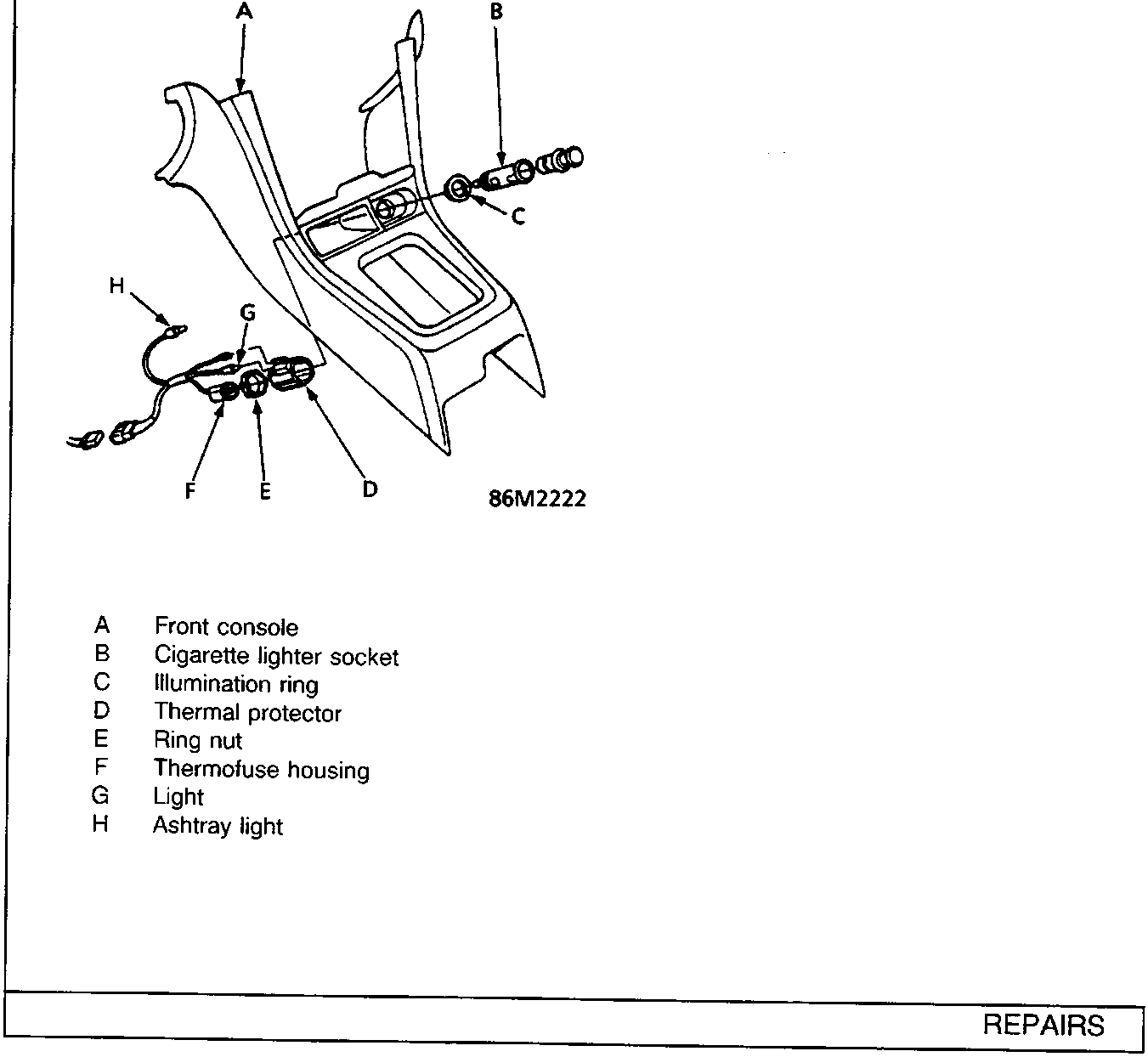
- A Front console
- B Cigarette lighter socket
- C Illumination ring
- D Thermal protector
- E Ring nut
- F Thermofuse housing
- G Light
- H Ashtray light
Parts & tools for this job For Rover 600
- TOOLDigital multimeterSearch: automotive digital multimeter
- PARTAssorted fuse kitSearch: car fuse assortment kit
- TOOLWire crimper and connector kitSearch: wire crimper connector kit
Links open Amazon search results in a new tab. As an Amazon Associate I earn from qualifying purchases.