
Circuit Diagram (page 2 of 3)
- Make
- Rover
- Model
- 600 Rover 600 Repair Manual - Volumes 1 and 2 - 2nd Edition
- Section
- Repairs
ElectricalCircuit Diagram · page 2 of 3
CAUTION:
- All SRS electrical wiring harnesses are covered with yellow outer insulation.
- Replace the entire affected SRS harness assembly if it has an open circuit or damaged wiring.
- Before disconnecting the SRS wiring harness, turn the ignition switch off, disconnect the negative and positive battery cables, and wait at least three minutes, see SUPPLEMENTARY RESTRAINT SYSTEM
- Remove the dashboard lower cover (see Ignition switch).
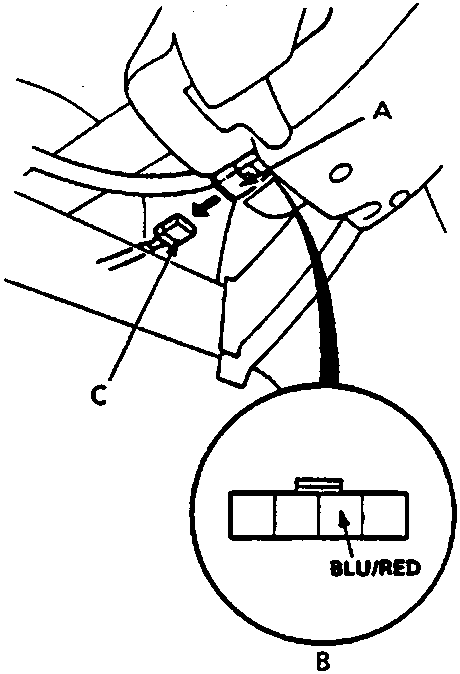
A 4–P connector (SRS main harness)
B View from wire side
C 4–P connector (main wire harness)
- Disconnect the SRS main harness 4–P connector from the main wire harness.
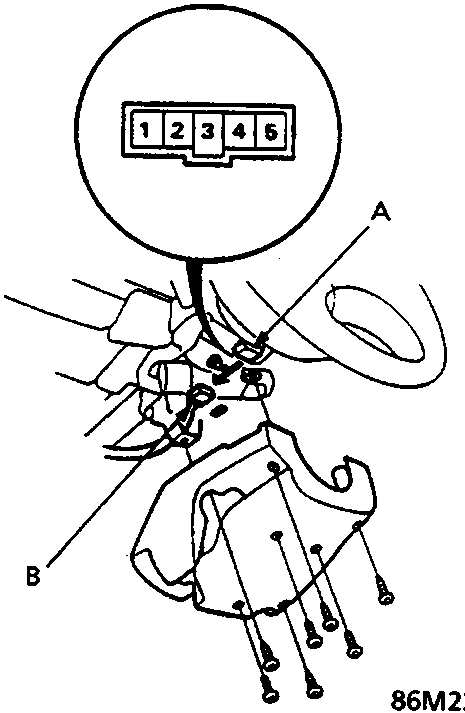
A Slip ring
B 5–P connector (SRS main harness)
- Check for continuity between the BLU/RED (SRS main harness side) terminal and body earth with the horn button pushed.
- If there is continuity, the horn switch is OK.
- If there is no continuity, go to step 4.
- Remove the column lower cover, and then disconnect the 5–P connector from the slip ring.
Note: See Supplemental Restraint System (SRS) – Type II before removing the connector locked with the connector lock pin.
- Check for continuity between No. 3 terminal and body earth with the horn button pushed.
- If there is continuity, check for bent, loose or corroded terminal, or an open in the BLU/RED wire between the SRS main harness.
- If there is no continuity, go to step 6.
Parts & tools for this job For Rover 600
- TOOLDigital multimeterSearch: automotive digital multimeter
- PARTAssorted fuse kitSearch: car fuse assortment kit
- TOOLWire crimper and connector kitSearch: wire crimper connector kit
Links open Amazon search results in a new tab. As an Amazon Associate I earn from qualifying purchases.